DEEBOT
DEEBOT X12S OmniCyclone
DEEBOT X12S PRO OMNI
DEEBOT X11 OmniCyclone
DEEBOT X8 MAX OMNI
DEEBOT X8 OMNI
DEEBOT X5 OMNI
DEEBOT T90 PRO OMNI
DEEBOT T90 OMNI
DEEBOT T80 OMNI
DEEBOT T80S OMNI
DEEBOT T50 MAX
DEEBOT T50 OMNI
DEEBOT T30S PRO PLUS
DEEBOT T30S PRO
DEEBOT N20 PLUS
DEEBOT N10 PLUS
DEEBOT U2
WINBOT
WINBOT W3 OMNI
WINBOT W2 PRO OMNI
WINBOT W1S
WINBOT W1
WINBOT NEO MINI
WINBOT Lite
GOAT
GOAT O600 RTK
GOAT A2000 LiDAR PRO
ULTRAMARINE
ULTRAMARINE P1
Support
ECOVACS HOME APP
App Wifi Connection
About Us
Commercial Robots
Store
Sign in to Ecovacs
Shopping Cart
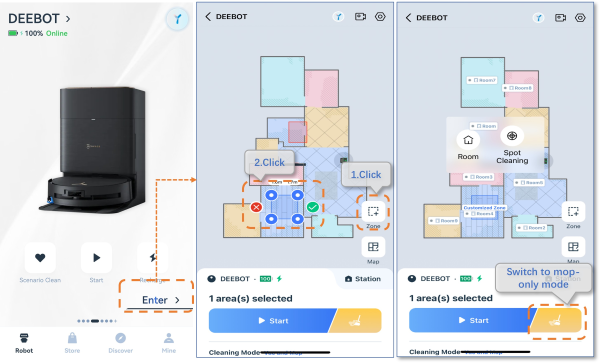
How to set mop-only mode?
Updated on 2025/04/29
1.Opne APP>Click Enter>Click Zone icon>Click yellow icon, mop only, to start cleaning.
Note:
mop-only mode,only one zone can be drawn, and the area must be less than or equal to 2m*2m.
Was this article helpful?
yes
no
home
support
deebot x8 max pro w2 pro omni
How to set mop-only mode?