DEEBOT
WINBOT
GOAT
ULTRAMARINE
Support
ECOVACS HOME APP
App Wifi Connection
About Us
Commercial Robots
Store
Sign in to Ecovacs
Sign up to receive points and coupons
Sign up
Already have an account?
Log in
Track Order
Refer & Earn
My Account
My Rewards
My Orders
My Coupons
Refer & Earn
Logout
Shopping Cart
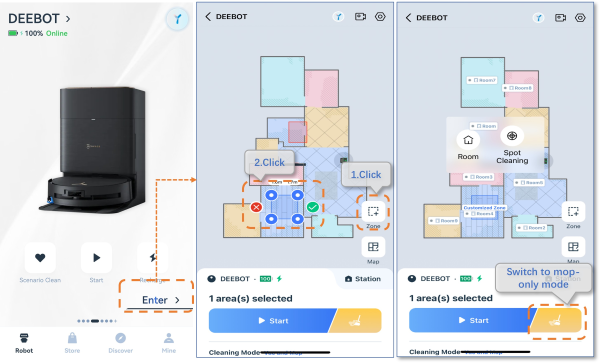
How to set mop-only mode?
Updated on 2025/04/29
1.Opne APP>Click Enter>Click Zone icon>Click yellow icon, mop only, to start cleaning.
Note:
mop-only mode,only one zone can be drawn, and the area must be less than or equal to 2m*2m.
Was this article helpful?
yes
no
home
support
bundle deebot x8 max pro omni
How to set mop-only mode?